
LinkedIn Headshots: Cost, Examples, Styles & Advice
San Francisco Bay Area LinkedIn Headshot Photography Guide
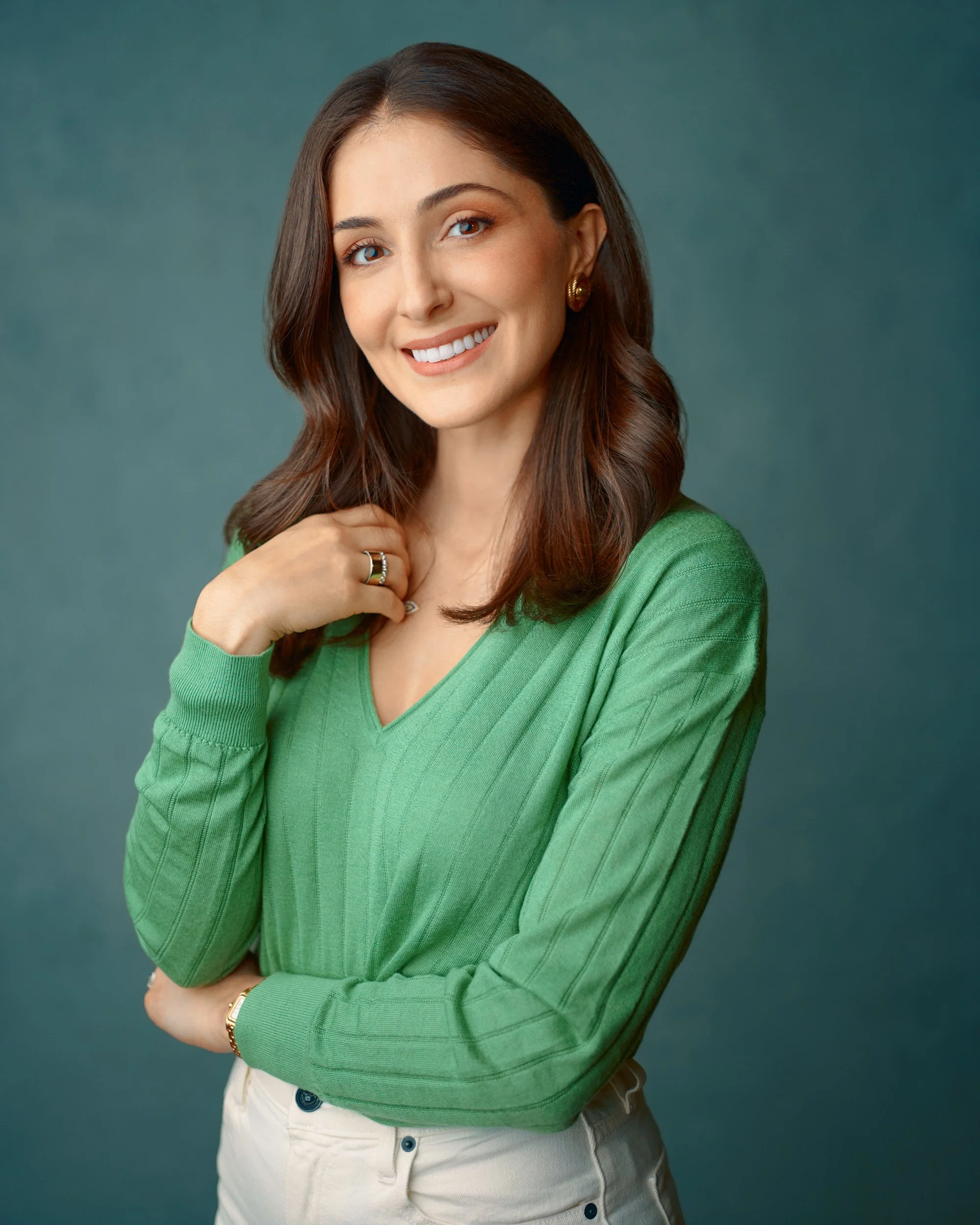
What to Know Before Your LinkedIn Headshot
S72 Business Portraits provides LinkedIn headshot photography at our San Francisco Bay Area studio or your location for company and team sessions. Every session is built for the person in front of the camera: custom lighting, full on-camera direction, and hand retouching on every image. This page covers what LinkedIn headshots are, what they should look like, what to wear, how much they cost, and how to choose the right photographer.
What Are Linkedin Headshots?
LinkedIn headshots are professional studio portraits used on your LinkedIn profile, company pages, and anywhere your name appears on the platform. Your photo shows up small in search results, comments, and connection requests. It has to read fast and build trust at a glance. S72 Business Portraits photographs LinkedIn headshots at its studio in San Francisco's SoMa neighborhood.
A strong LinkedIn headshot balances confident posture with a relaxed expression. Hiring managers and clients will see it on phones and laptops, so the image has to hold up across both. Head-and-shoulders framing with steady eye contact and a clean background is the standard. The details (lighting, backdrop, camera angle) change based on your role and your goals on the platform.
A recent graduate might want a warmer, open look. A VP might want something more directional that signals leadership without looking stiff. Either way, the goal is the same: clarity at small sizes, and genuine at full view.
Why Do Linkedin Headshots Matter?
Your LinkedIn photo is the first thing people see before they read your headline, check your experience, or decide whether to reply to your message. They form an opinion in less than a second.
LinkedIn's own data backs this up. Profiles with a professional photo get up to 21x more views. They receive 9x more connection requests and 36x more messages. A missing or low-quality photo doesn't just fail to help you. It works against you.
Recruiters skip profiles without photos. Potential clients check your LinkedIn before a first call. Investors look at founder profiles before taking a meeting. If your headshot is blurry, outdated, cropped from a group photo, has bad retouching or clearly generated by AI, that's the impression you're making before you ever say a word.
The good news: this is one of the easiest things to fix.
Who Needs Linkedin Headshots?
LinkedIn headshots are useful for anyone whose profile is part of how they get hired, win clients, or build credibility. Here's who gets the most value.
Job seekers and career changers: If you're applying for roles, recruiters are checking your LinkedIn before they read your resume. A current, professional headshot signals you're serious. Students and career shifters use a fresh portrait to align with a new direction. Recruiters notice when the photo looks like someone ready for the role.
Consultants and salespeople: Your photo appears next to every message, comment, and connection request. If you're in a client-facing role, your headshot starts the conversation before you do.
Executives: If you publish articles, speak at events, or comment on industry news, your headshot anchors that activity in the feed. A consistent studio look helps people recognize you across platforms.
Teams: Companies planning a website refresh or rebrand often update everyone's headshot at once so the look stays consistent across LinkedIn and the company site. A unified set of portraits signals that your team is put together.
What you need from the headshot depends on your field. Product managers tend to want even, natural light with a neutral backdrop for a modern, distraction-free look. Attorneys often prefer more directional light for added gravity. Healthcare leaders usually ask for a brighter studio feel that still looks real. Your role and your goals on the platform drive every decision about lighting, framing, and backdrop.
How Often Should I Update My LinkedIn Headshot?
The general rule is every one to two years. But certain changes should move that timeline up.
Update your headshot if you've changed roles or industries, if your hair or appearance has changed noticeably, if you've gained or lost significant weight, or if your current photo is more than two years old. If someone meeting you for the first time wouldn't recognize you from your LinkedIn photo, it's time.
A headshot that doesn't look like you creates a trust problem before the conversation starts. The goal is simple: your photo should match the person who walks into the room.
What Should I Look For In A Linkedin Headshot Photographer?

Start with the portfolio. Look at multiple galleries and check for variety in expression, backdrops, and lighting. If every headshot looks the same, the photographer is using one setup for everyone. That's fine for a quick headshot booth. It's not what you want for LinkedIn, where your photo needs to look like you, not like the last person who sat in that chair.
Ask about direction. Most people are uncomfortable in front of a camera, and the discomfort usually comes from not knowing what to do. A good photographer will coach your posture, chin angle, and breathing to keep your expression natural under studio lights. If the photographer doesn't mention coaching or direction, that's a red flag. You shouldn't have to figure out what to do with your face on your own.
Ask about retouching. You want light-touch cleanup: flyaway hair, temporary blemishes, tone balancing. Not plastic skin. Overdone retouching looks fake fast on LinkedIn, and it gets worse at small sizes. Ask to see before-and-after examples so you know what you're getting.
Check the logistics. Turnaround time should fit your deadline. A clear reshoot policy removes risk if the first session doesn't land. And make sure you understand how the session works from start to finish: prep, shooting, image selection, and delivery.
Questions to ask before you book:
How will you direct me so my expression stays natural under studio lights?
Do you build the lighting and backdrop for each person, or use one setup?
Can I see before-and-after retouching examples?
What is your typical turnaround time, and what's your reshoot policy?
What Should LinkedIn Headshots Look Like?
A good LinkedIn headshot uses simple backdrops, lighting shaped for your role, head-and-shoulders framing near eye level, and light-touch retouching that keeps you looking like yourself.
Backdrop. Keep it simple. Light gray reads modern and clean. A slightly darker tone adds authority. Textured canvas gives a more classic studio feel. Each works for different roles, but the common thread is that the backdrop should never compete with your face.
Lighting. Even, soft light creates a friendly and open look. More directional light adds depth and feels more serious. The right choice depends on your role and how you want to come across on the platform. What matters is that the lighting is built for you, not recycled from the last session.
Framing. Head and shoulders, shot near eye level. Your face should fill roughly 60% of the frame, because LinkedIn crops your photo into a small circle. Anything wider and you disappear at thumbnail size. Camera height near eye level keeps your proportions natural and avoids the look of shooting up or down at someone.
Retouching. Light touch. Flyaway hair, temporary blemishes, minor skin cleanup, and tone balancing. Your skin should look like skin, not plastic. LinkedIn displays your photo small in feeds and larger when someone clicks your profile, so retouching that looks fine at full size can look overdone when it shrinks down.
The test. Your headshot should look crisp in feeds, genuine at full size, and consistent with how you present yourself everywhere else. If it passes all three, it's working.
What Should I Wear For LinkedIn HeadshotS?

Clothes that fit well and match how you want to come across. Tailored jackets, simple knits, or a crisp shirt with some texture all work. Avoid loud patterns. Small repeating prints can moiré at LinkedIn's thumbnail size and look distracting on screen.
Colors. Pick a palette that works with your backdrop. Cool blues and charcoal look sharp on lighter paper. Lighter tones pop against a deeper background. Solid colors are the safest bet, but subtle texture is fine.
Accessories. If you wear jewelry or glasses, keep the shapes simple. They should add interest, not pull focus. If you wear glasses daily, wear them for the shoot. Glare can be managed with lens angle and light placement.
Grooming. Come as you normally look, just polished. Soft layers and clean lines work well with studio light. If bold color or a graphic tee is your thing, bring it. It can work when the rest of the frame is clean.
Necklines. Test your outfit before the session. Raise your arms, shift your shoulders, and check how the fabric sits. You want the neckline and lapels to stay tidy in a head-and-shoulders frame. Bring one alternate top in case your first pick feels too busy on camera.
Before your session, try on your outfit a few days early to make sure everything still fits and doesn't need cleaning.
What Are The Right LinkedIn Photo Specs?
LinkedIn displays your profile photo as a circle. It shows up small in search results, comments, and connection requests, then larger when someone clicks your profile. Your image needs to look sharp at both sizes.
Here are the specs that matter:
Minimum size: 400 x 400 pixels. LinkedIn will reject anything smaller.
Recommended upload size: 800 x 800 pixels or larger. This keeps the image crisp on high-resolution screens.
Aspect ratio: 1:1 (square). LinkedIn lets you upload a rectangle but forces a square crop before saving.
File format: JPG for photos. PNG if you need sharper edges.
Max file size: 8 MB.
Because LinkedIn crops to a circle, anything near the corners of your square image gets cut. Keep your face centered and leave space above your head and below your chin. Your face should fill roughly 60% of the frame.
A studio headshot gives you a high-resolution file you can crop for LinkedIn, your company website, email signature, and conference bios without losing quality. A phone photo or AI-generated image often starts at lower resolution and falls apart when LinkedIn compresses it further.
How Much Do LinkedIn Headshots Cost?
LinkedIn headshots in the San Francisco Bay Area typically range from $150 to $800 for a solo session, depending on the photographer, session length, and what's included. Budget options under $150 exist, but they usually mean a less skilled photographer, fixed lighting, one backdrop, and heavy retouching that looks fake at small sizes. At the higher end, you get custom lighting, personal direction, light-touch retouching, and high-resolution files.
The price makes more sense when you think about where the photo goes. A single headshot can cover your LinkedIn profile, company website, email signature, conference bios, pitch decks, and press features. One session, used across all of those touchpoints, for one to two years.
If you want multiple looks or expressions for different uses, plan for a longer session so each version gets its own lighting and coaching. Rushed sessions produce rushed results.

What Is the Difference Between LinkedIn Headshots and AI Headshots?
AI headshot tools are everywhere. They're fast and cheap, and some of them look decent at first glance. But LinkedIn creates specific problems that AI headshots struggle with.
Expression. AI generates a face based on a pattern. It doesn't capture how you actually look when you're engaged, confident, or approachable. The result often lands in an uncanny middle ground: polished but empty. Recruiters and clients spend all day looking at LinkedIn photos. Many of them can tell.
The circular crop. LinkedIn displays your photo as a small circle. At that size, subtle problems with AI-generated images get amplified. Skin that looks too smooth or eyes that don't quite track become more obvious, not less, when the photo shrinks.
Consistency across a team. If your company needs headshots for multiple people, AI tools can't match lighting, backdrop, and color grading across the group. Each image is generated independently. The result looks disjointed on a team page or company website.
Recognition. Your headshot should look like you when someone meets you in person. AI headshots are built from composites and often drift from how you actually look. That gap creates a trust problem before the first handshake.
AI headshots solve a convenience problem. A real headshot solves a trust problem. On LinkedIn, trust is the whole point.
Why Choose S72 for LinkedIn Headshots?
I don't use preset lighting or recycled setups. Every session is custom-built for you: your role, your goals on the platform, and how you want to come across. That's why my portfolio doesn't look like the same headshot repeated 200 times.
I direct the entire session. You don't need to come with poses planned or know what to do in front of a camera. I handle posture, angles, expression, and lighting adjustments in real time. You just need to be there.
Every image gets retouched by hand. No batch filters. No AI editing. Just light cleanup that keeps you looking like yourself.
I back every session with a 100% money-back guarantee. If you're not happy with your headshots, you don't pay.
S72 Business Portraits is located in San Francisco's SoMa neighborhood. If you're ready to get a LinkedIn headshot that actually works for you, book your session here or get in touch below.